The requested CNAME records gave not been created correctly
You will see this message if your DKIM request has been rejected.
Cause
You will see this message if the CNAME records have not been set up correctly.
Solution
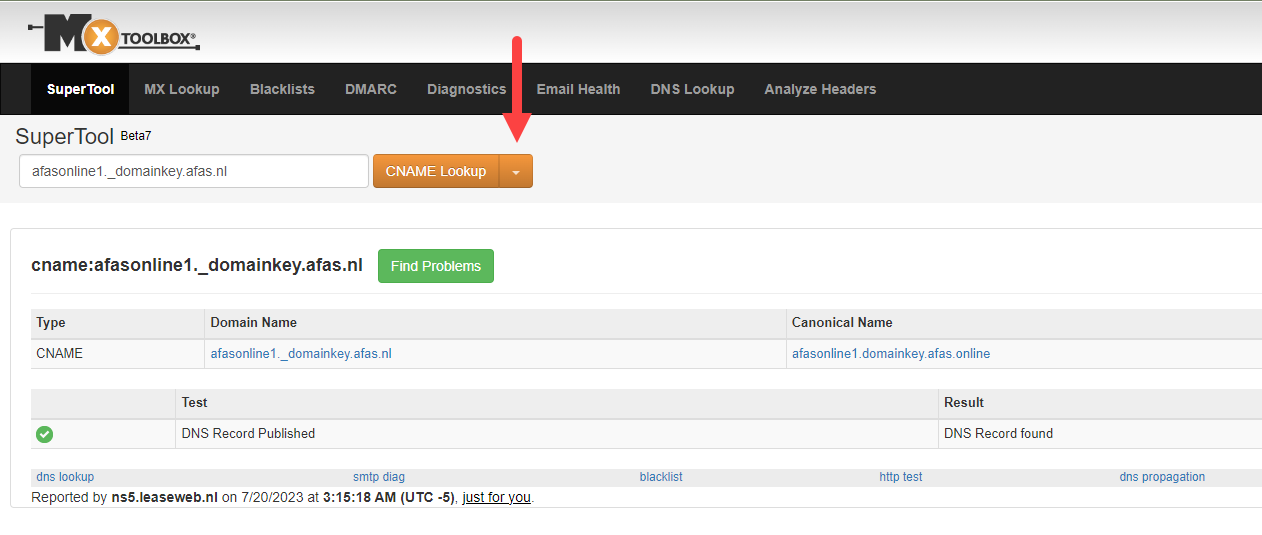
You can resolve this issue by checking at https://mxtoolbox.com/SuperTool.aspx whether the records have been set up correctly. To do this, follow the steps below:
Please note:
AFAS Support does not provide assistance with creating CNAME records. Please contact your own system administrator or hosting provider for this.
- Go to the website above and select ‘CNAME Lookup’.
- Copy the text from the image below and replace ‘afas.nl’ with your own domain:
afasonline1._domainkey.[your domain]
- If the record has been created correctly, you will see the value ‘afasonline1.domainkey.afas.online’ in the ‘Canonical Name’ column. Do the same for the second CNAME record.
- Did it work? If so, you can complete the DKIM application and you will receive a username and password.
|
Direct naar |